
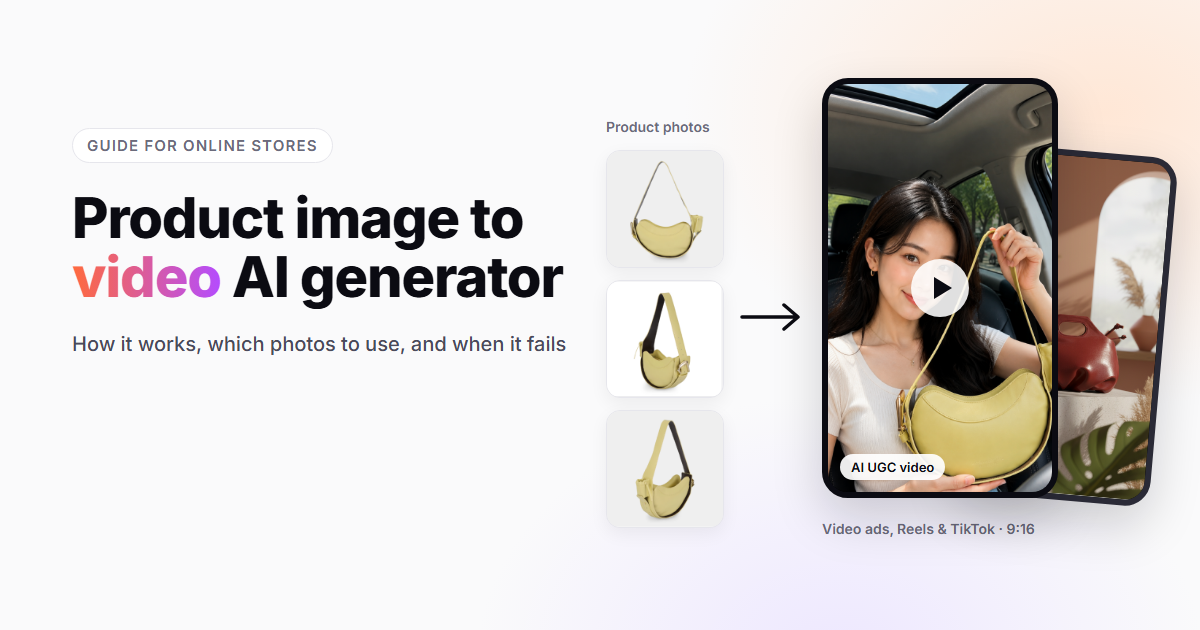
Most online stores have the same gap. Every product has clean photos, but very few have video, and video is what Reels, TikTok, and most ad placements now favor. Filming every SKU is not realistic for a small team.
A product image to video AI generator is built for exactly that gap. This guide explains what these tools do, how they work, which photos give you good results, and where you still need a human to step in. We use screenshots from Promer, an AI ad creation tool, to show what each step looks like in practice.
What is a product image to video AI generator?
A product image to video AI generator is a tool that takes a still photo of a product and turns it into a short video. Depending on the tool, the output can be the product itself in motion, the product placed into a new scene, or a person presenting the product in a user-generated content (UGC) style.
For online sellers, the point is simple: you start from the photos you already have in your catalog, and you get video you can use in ads, on social media, and on product pages without a photo shoot.
How does a product image to video AI generator work?
Most tools follow the same four stages:
- You upload the product image. Some tools also let you import the product from your store, which pulls in the title and description.
- The tool analyzes the image. It identifies the product and the layout so it can keep the product’s shape, color, and label consistent while the camera or scene changes.
- You choose what the video should do. This is where tools differ: some only add motion, others write a short ad script, add a voiceover, or place an AI presenter next to the product.
- The tool generates the video, usually in vertical 9:16 for Reels and TikTok, with a horizontal option for other placements.
Promer is an AI ad creation tool that turns a single product photo into a video ad or an AI UGC video. In its product image to video AI generator, the flow is: select the image, pick an animation script, and generate the videos.
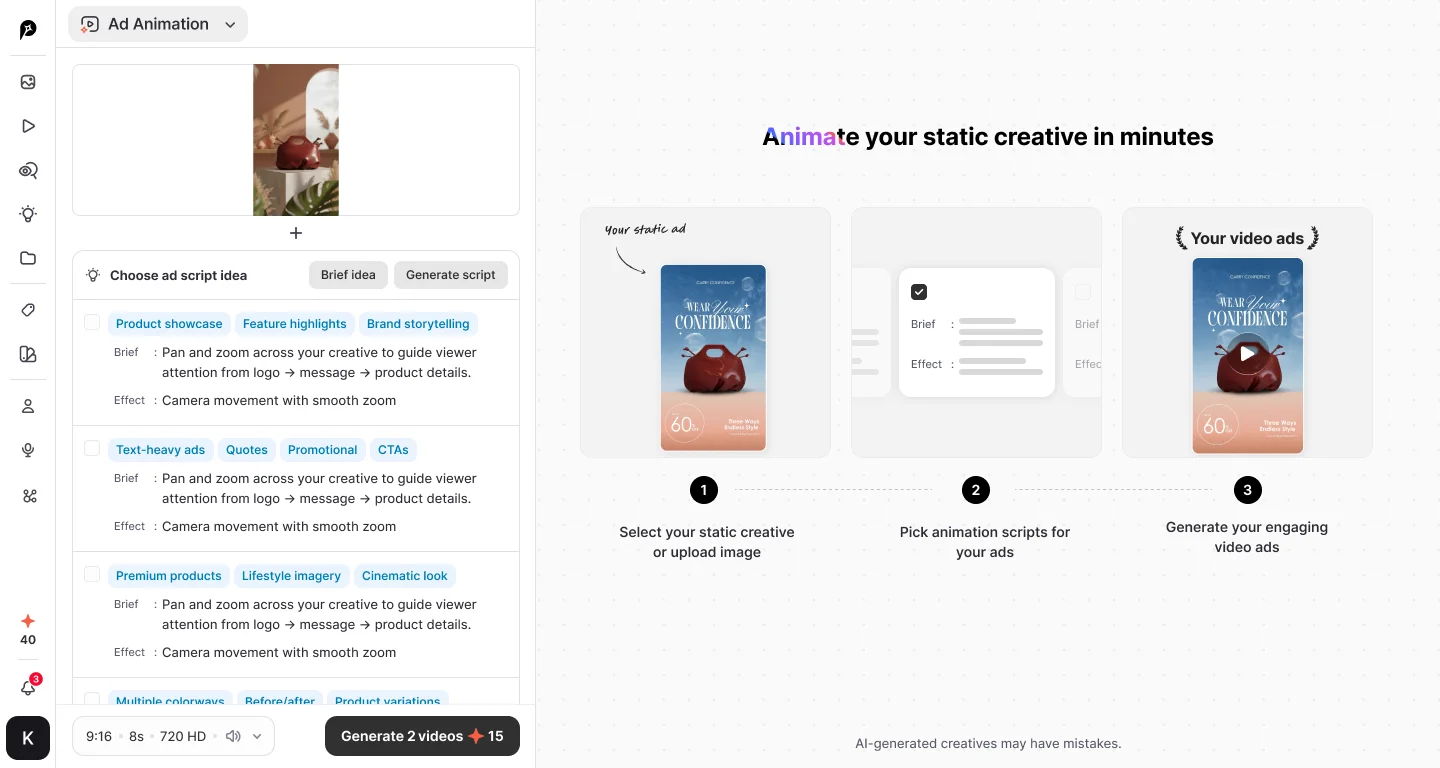
The script step is worth a closer look. Instead of a blank prompt box, the tool suggests animation ideas grouped by purpose (for example product showcase, feature highlights, or text-heavy promotional ads), each with a one-line brief and an effect such as “camera movement with smooth zoom.” You pick the ones that fit and generate several videos at once, which makes it easy to compare versions side by side.
What kinds of videos can you make from one product photo?
From a single image, there are three common types of output:
| Type | What you get | Best for |
|---|---|---|
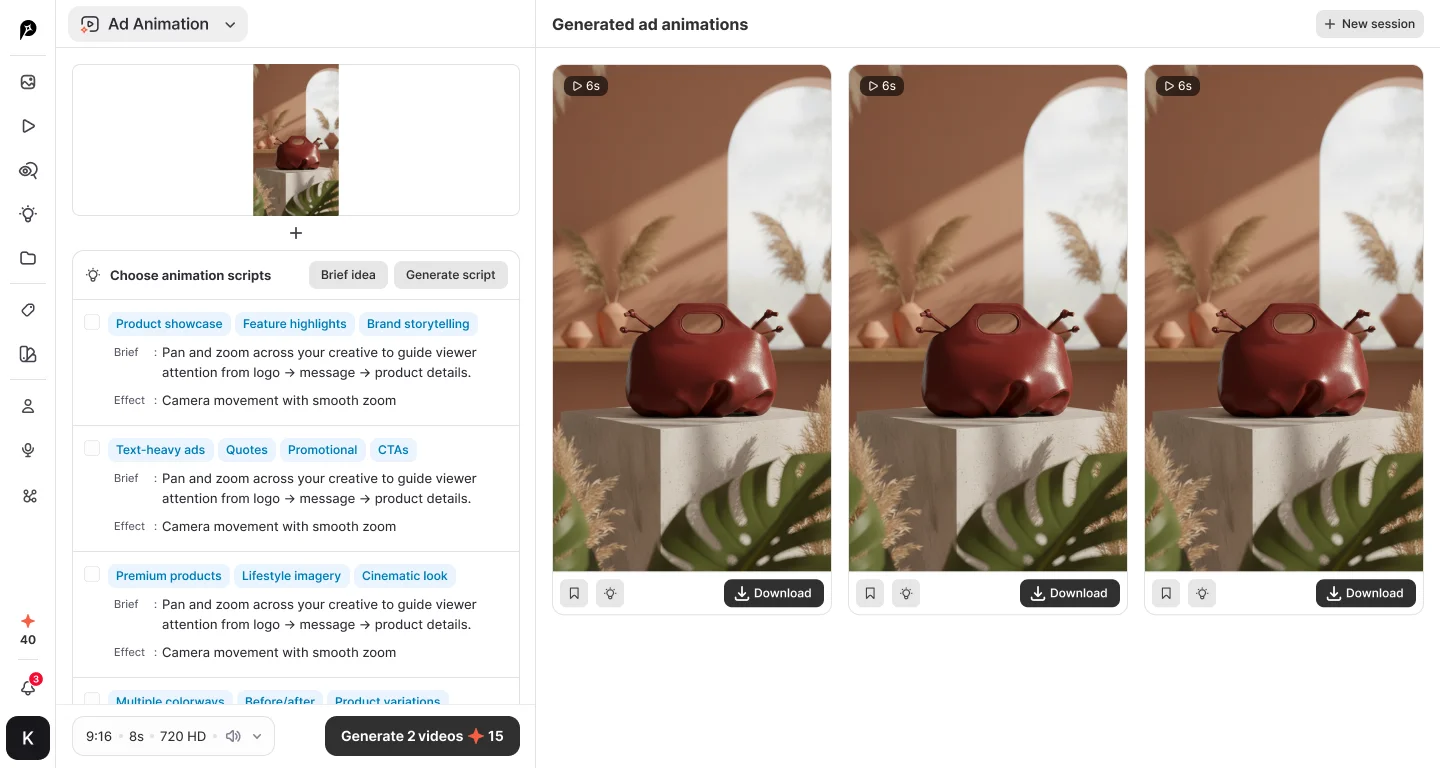
| Animated product shot | The product moves: camera pans and zooms, light changes, a new background | Product page videos, simple ads, catalog content |
| Ad remake | The structure of an ad that already performs well, rebuilt around your product | Testing proven ad formats without starting from scratch |
| AI UGC video | An AI presenter holds, shows, or talks about the product, in the style of a creator video | TikTok, Reels, and paid social ads where UGC tends to perform |
Promer covers all three: it can animate a static image into a video, clone the structure of a winning video ad with your product, or turn product photos into an AI UGC-style video.
Can you make a UGC video from just a product photo?
Yes. This is one of the most useful things these tools can do for small stores, because UGC-style ads normally mean finding creators, shipping products, and waiting for footage.
With an AI UGC video generator, the process looks like this:
- Add your product photos. Several angles of the same product help the presenter hold and show it consistently.
- Pick a video format, such as a “day in the life” or routine-style video. The tool suggests a video idea based on the product.
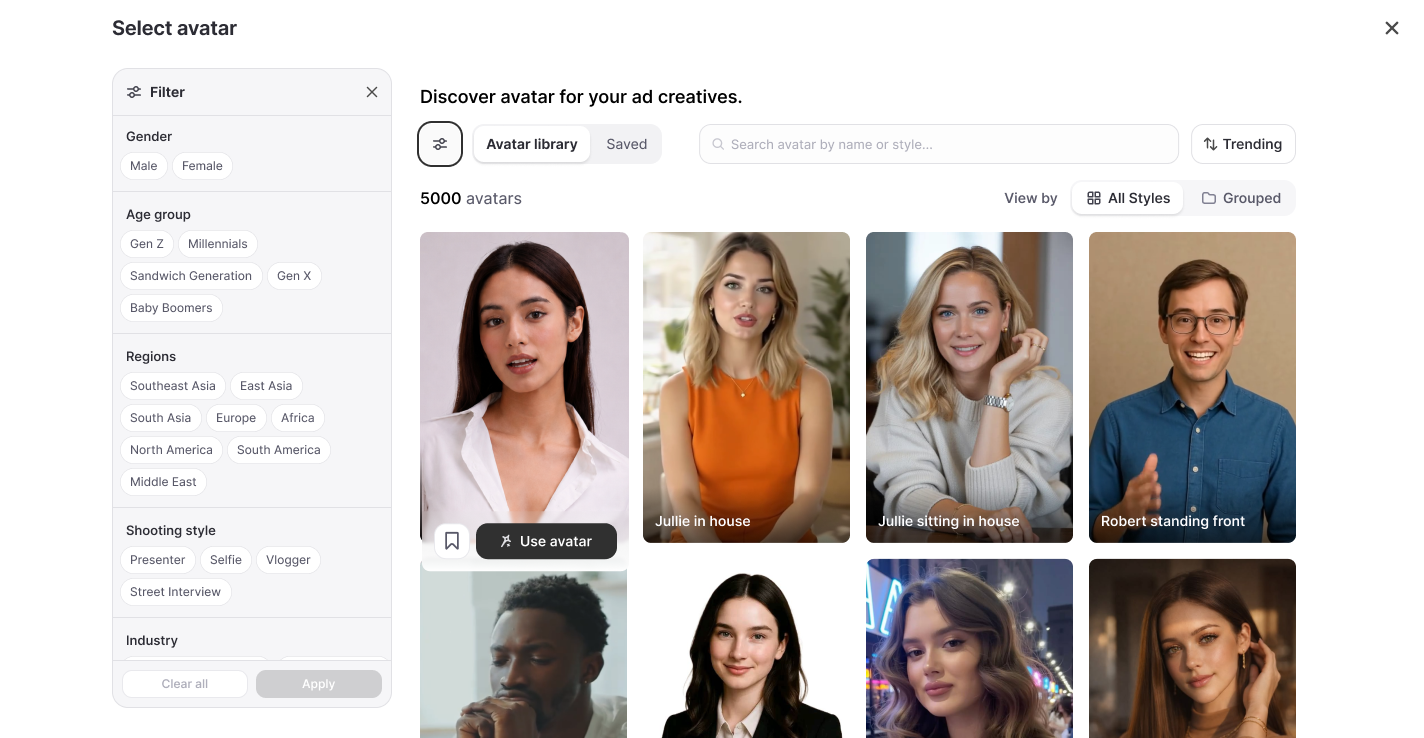
- Choose an AI presenter and a voice. In Promer, the avatar library has 5,000 presenters you can filter by gender, age group, region, industry, and shooting style (presenter, selfie, vlogger, or street interview).
- Generate the script and the video. The script is split into scenes, so you can see exactly what happens and when.
A finished UGC video follows the same structure as a good creator ad: a hook in the first seconds, the problem the product solves, a close look at features, and a call to action.
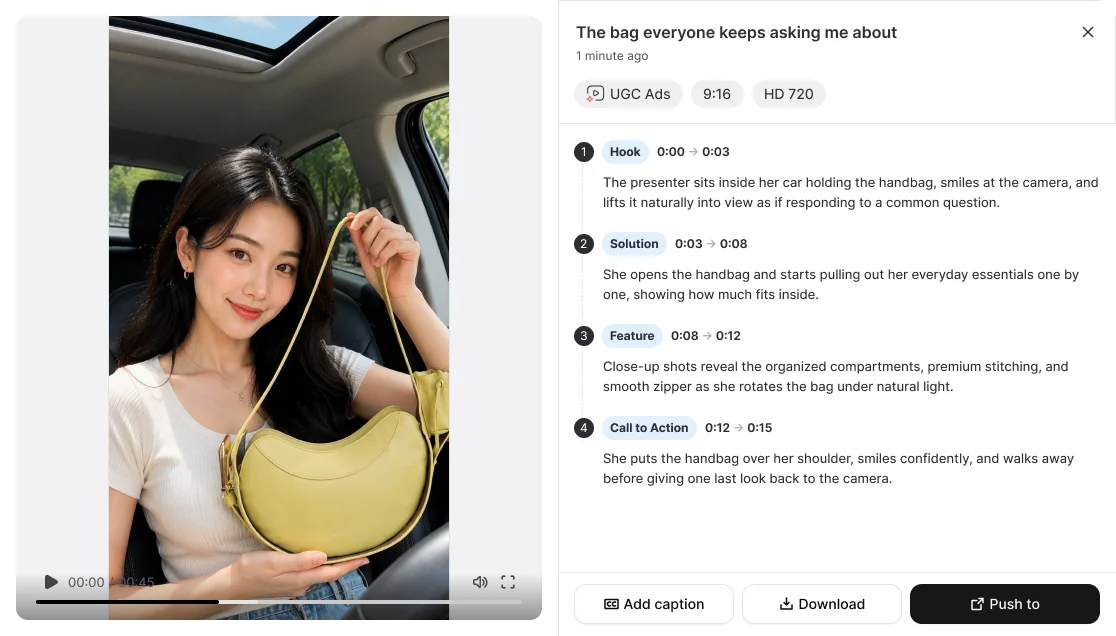
Two things to keep in mind:
- Check every video before it runs. The product should look like the real one, and the presenter should not claim results your product cannot deliver.
- Follow your ad platform’s disclosure rules for AI-generated or synthetic content where they apply.
Which product photos work best?
The output can only be as good as the input. Photos that work well:
- High resolution. Use the original file, not the compressed version from your store.
- Clear product, simple background. A clean packshot gives the tool the least to guess about.
- The whole product in frame. Cropped edges often come out distorted when the tool adds motion.
- Accurate color and readable labels. The tool will reproduce what it sees, including mistakes.
- More than one angle if the tool accepts it. A front shot plus a side or detail shot helps it keep the product consistent.
Photos that cause problems:
- Busy lifestyle shots with several products in the frame
- Transparent or highly reflective products on a cluttered background
- Images with text or badges printed on top of the product
Where does a product image to video AI generator still fall short?
These tools are good at producing a lot of usable video quickly. They are not perfect, and it helps to know the common failure points:
- Small text and fine logos can blur or change between frames.
- Hands and products together are harder than products alone. Look closely at how the presenter holds the item.
- Physical behavior such as pouring, folding, or a product being used can look unnatural.
- Scale is easy to get wrong. A product can look larger or smaller than it really is.
The practical fix is to generate several versions, keep the best one, and treat the output as a first draft rather than a finished ad.
Product image to video AI vs. filming vs. a photo slideshow
| Filming | Photo slideshow | Product image to video AI generator | |
|---|---|---|---|
| Starting point | The physical product | Existing photos | One or more product photos |
| Time per video | Hours | Minutes | Minutes |
| Looks like real video | Yes | No | Mostly |
| UGC-style option | Needs a creator | No | Yes, with an AI presenter |
| Best for | Hero products, unboxings | Quick posts | Testing many products and hooks |
Most stores end up combining them: film the two or three best sellers properly, and use AI to cover the rest of the catalog and to test which angles get attention.
How to get the video in front of shoppers
A video only sells if people can buy from it. Once you have your clips:
- Post them as Reels and TikToks and tag the products from your catalog so viewers can tap through.
- Use the best performers in paid ads, since you already know they hold attention.
- Show them on your store. A shoppable feed on your homepage or product pages lets visitors watch the same videos and add the tagged product to cart. With Socialwidget, you can display your Instagram and TikTok videos on your Shopify store as a shoppable feed.
Product image to video AI generator: common questions
Do I need video editing skills?
No. You upload a photo, choose a format, and the tool produces the video. Editing skills help if you want to trim or combine clips afterwards, but they are not required.
How long are the videos?
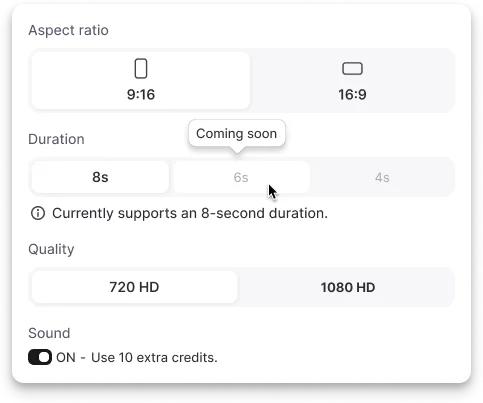
Short. These tools are built for ads and social media, so clips are usually well under a minute. As an example, at the time of writing Promer’s image animation produces 8-second clips.
What format should I export for Instagram Reels and TikTok?
Vertical 9:16. Use 16:9 for YouTube and other horizontal placements.
Will the video look exactly like my product?
Usually close, but not always. Check colors, labels, and proportions on every video before you publish it.
Can I use the videos in paid ads?
Generally yes, but read the tool’s terms of use and your ad platform’s policies on AI-generated content first.
What is the difference between a product image to video AI generator and an AI UGC video generator?
A product image to video AI generator focuses on turning the product photo itself into a video. An AI UGC video generator adds a presenter who shows and talks about the product, in the style of a creator video. Some tools, including Promer, do both.
Final thoughts
If your catalog has hundreds of photos and almost no video, a product image to video AI generator is the fastest way to close that gap. Start with your best-selling products, use clean photos, generate a few versions of each, and keep only the ones that look right. Then put them where shoppers can buy: in your Reels, your ads, and on your store.

hienpv

